A private GLP-1 log on iPhone
Private GLP-1 dose tracking on iPhone with logged-dose history, optional activity estimates, and reminders. See PepLedger’s limits. Not medical advice.
Start with a clean GLP-1 record
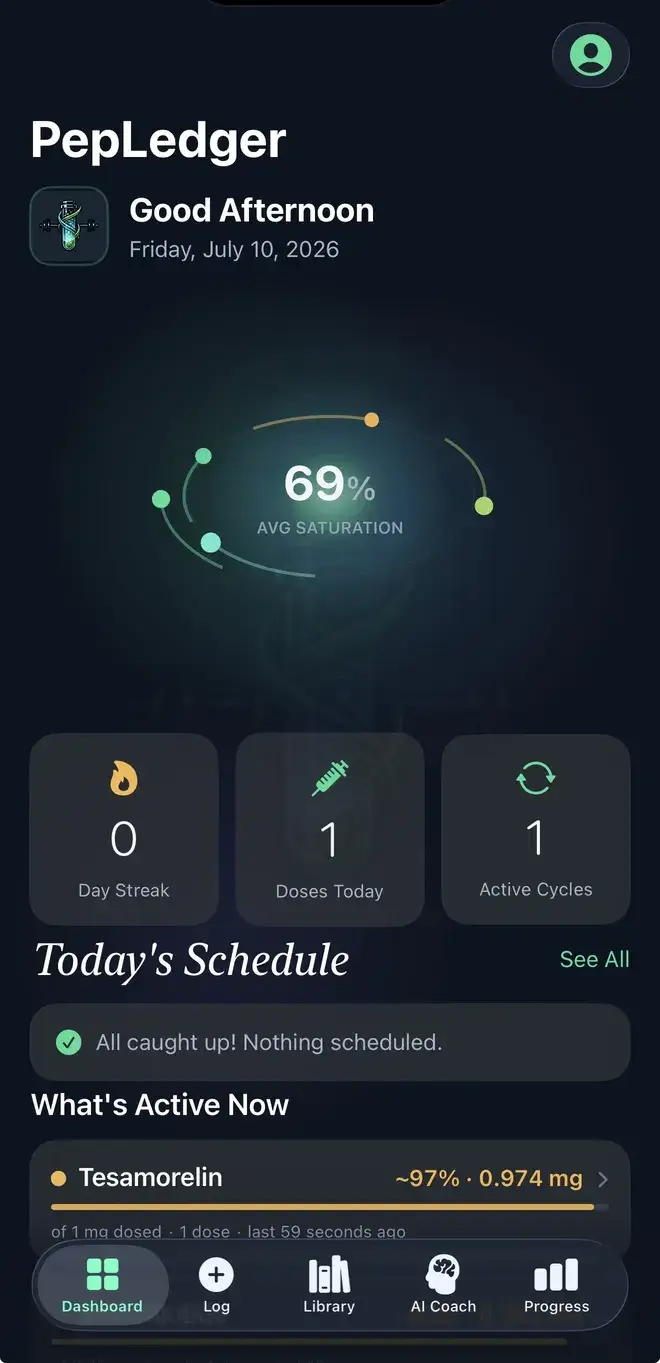
A GLP-1 record is most useful when it answers a historical question without asking someone to reconstruct dates from messages, calendar entries, or loose notes. PepLedger gives that history a dedicated iPhone timeline. A user can enter a reference name, amount, unit, date, time, method, site, label note, and personal observation. GLP-1 products and formulations can have different labeled cadence and half-life context; What’s Active Now is a mathematical estimate from history, not a lab result.
Begin with an event that actually occurred. Enter the amount and unit exactly as you want them preserved, then add date and time. If a label, pharmacy record, or other source supplied a detail, place it in the note so a later reader can distinguish transcription from commentary. Method and site can remain separate from free text. An inventory or expiration note describes what the user entered; it does not establish identity, quality, storage, or safety.
Review a GLP-1 timeline factually
After saving, scan the history for duplicate dates, a swapped unit, or a planned note accidentally written as a completed event. Keep an observation separate from the event itself. If a transcription is corrected, retain enough context to know what changed and why. A dated body metric or laboratory value can be entered separately, but a nearby observation does not show that a GLP-1 event caused it. PepLedger does not diagnose, interpret results, or measure medication levels.
Reminders are organizational prompts to review a record. Discreet Mode can keep reminder wording general, and Face ID or a PIN can help protect a visible phone. Neither is clinical oversight. The peptide reconstitution calculator, Reverse GLP-1 Dose Calculator, and GLP-1 Level Plotter show entered arithmetic or a general decay illustration; none chooses an amount or timing.
If site rotation is relevant to your history, record the site used for each event and keep it separate from amount and timing. The app preserves the field; it does not choose a site or provide administration directions.
Estimates, privacy, and responsibility
Any active estimate depends on user-entered dates, units, and a configured assumption. It is not a blood concentration, diagnosis, effectiveness claim, safety assessment, or individualized model. Missing entries or incorrect units can change the display. PepLedger does not sell GLP-1 products, verify a product or treatment, or validate a compound.
Every meaningful fact is supplied by the user: name, amount, unit, date, time, site, note, inventory detail, metric, or lab value. Read the Privacy Policy, About PepLedger, and calculation methodology. The app is for iPhone and iPad on iOS 18 or later, not a clinic portal or medical device. Current Pro features and pricing appear in the app. Open the official PepLedger App Store listing. This page is informational, not medical advice.
Prepare a factual handoff
If you later share a GLP-1 history with a qualified healthcare professional, begin with the date range and the source of each important field. Mark a missing entry as missing instead of filling it from memory. Keep a correction note when a unit or date was transcribed again. This makes the record easier to discuss while preserving uncertainty. A record can be complete as a record and still be insufficient for a personal health decision.
Use the timeline to explain what you documented, not to imply what happened inside your body. PepLedger cannot tell whether a GLP-1 product is genuine, whether an entry is appropriate, or what a result means. Its narrow role is organizing user-entered facts, reminders, and clearly labeled estimates. Personal questions belong with a qualified professional.
For a repeat review, compare the app’s history with the original records rather than assuming a missing field. Keep dates, units, and notes legible to the person who will read them later. This workflow supports a conversation about the record while preserving the fact that the app has no independent knowledge beyond what was entered. If the record is incomplete, its honest limitation is more useful than a confident reconstruction. A date can be accurate while an interpretation remains unknown. That distinction should remain visible. This is the difference between a useful log and an invented answer.